Mesh WiFi vs access points comes down to one question in a large home: can you get Ethernet to the places where WiFi needs to be strongest? If yes, wired access points usually give you the more predictable long-term network. If not, a well-placed mesh system can be the right fix. A mesh system with Ethernet backhaul can also split the difference.
Large homes make WiFi harder because the signal may have to cross floors, long hallways, dense walls, media rooms, home offices, patios, cameras, TVs, speakers, and many everyday devices. A faster internet plan cannot solve all of that by itself.
Key Takeaways
- Choose wired access points when Ethernet is available and consistency matters most.
- Choose mesh WiFi when running new cable is difficult or disruptive.
- Consider wired-backhaul mesh when you want mesh simplicity with a wired foundation.
- Plan around layout, walls, device demand, and backhaul before buying hardware.
What Is the Real Difference Between Mesh WiFi and Access Points?
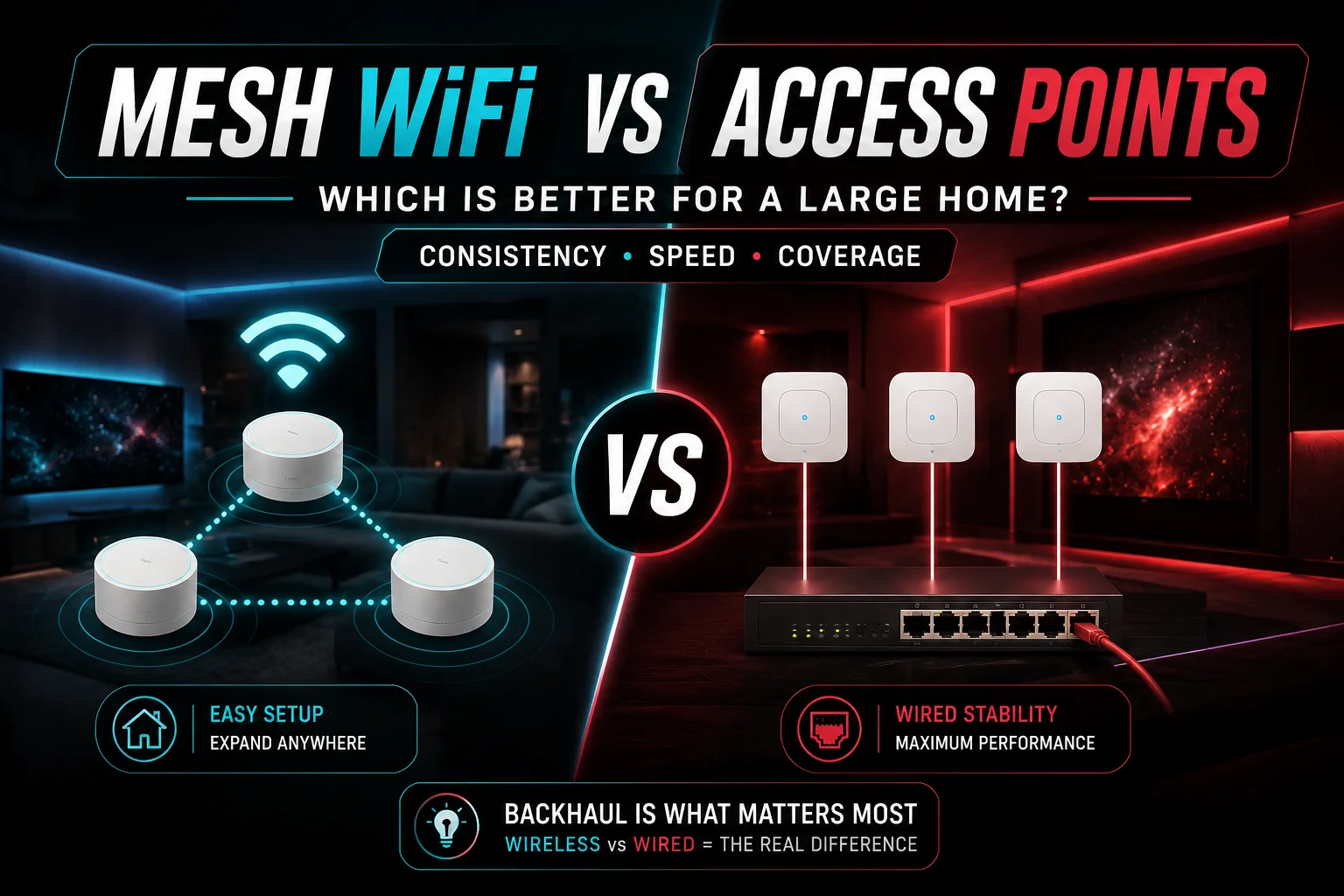
Both systems put more than one WiFi radio around the home. The real difference is how those radios connect back to the network.
Mesh WiFi
A mesh system uses a main router or gateway plus satellite nodes. Those nodes can connect wirelessly, through Ethernet, or through a mix of both.
That makes mesh attractive in finished homes because you do not need a cable at every node. Most consumer systems also use one app for setup, updates, and network management.
The tradeoff appears when nodes depend on wireless backhaul. Distance, interference, walls, and extra wireless hops can weaken the connection between nodes.
Wired Access Points
A wireless access point, or AP, creates WiFi in a specific area but usually connects back to the network through Ethernet.
A network switch can feed several APs and other wired devices. Many professional APs also use Power over Ethernet, or PoE, so one cable carries data and power.
The key advantage is simple: the AP does not need WiFi to reach the rest of the network.
Why Backhaul Matters More Than the Name on the Box

Backhaul is the connection between a remote WiFi unit and the rest of your network.
A wireless mesh node can show strong WiFi bars on your phone while still having a weak link back to the main router. That is how you can get a good-looking signal but still see buffering or frozen video calls.
A wired access point avoids that specific problem because its upstream path is Ethernet.
TP-Link’s Ethernet backhaul guidance, updated April 17, 2026 says Ethernet backhaul on Deco systems provides a faster, more stable connection than wireless backhaul and removes the bandwidth loss created by the wireless hop. It also allows wired and wireless backhaul in the same mesh network.
eero’s current Ethernet-backhaul guidance gives similar practical advice: when a home already has Ethernet, eero recommends using those connections because wired backhaul can maximize internet speeds and reduce wireless interference.
Wireless mesh can still work very well. It simply depends more on node placement and the quality of the wireless path between nodes.
Mesh WiFi vs Access Points: Large-Home Comparison
| Factor | Mesh WiFi | Wired Access Points |
| Installation | Easier when no Ethernet exists | Requires Ethernet to AP locations |
| Backhaul | Wireless, wired, or mixed | Usually wired Ethernet |
| Consistency | Depends on node placement and backhaul | Usually more predictable |
| Latency | Can rise across weak wireless hops | Typically lower and steadier |
| Coverage | Easy to expand, but nodes need a healthy upstream link | Planned around wired AP locations |
| Management | Usually simple and app-based | Often offers deeper control |
| Best fit | Finished homes where cabling is difficult | Large homes with Ethernet or planned wiring |
When Is Mesh WiFi the Better Choice?
Mesh makes sense when the house is finished and getting Ethernet to every useful location would mean opening walls or turning a WiFi fix into a larger construction job.
It also works well for homeowners who want simple management and do not need detailed network controls.
A good mesh setup needs well-placed nodes. A common mistake is putting a node directly inside a dead zone. That node still needs a good connection to another node. If its upstream link is poor, moving it closer to your phone does not fix the real problem.
Current TP-Link guidance on Deco network size also says adding more units does not always improve wireless throughput or stability. For most Deco models using WiFi or powerline backhaul, TP-Link recommends up to six units. That number is specific to Deco, not a universal limit for every mesh platform, but the broader lesson is useful: more nodes are not automatically better.
When Are Wired Access Points the Better Choice?
Access points make more sense when the home already has Ethernet, when new wiring can be installed cleanly, or when the network supports rooms and devices that need consistent performance.
That may include:
- A home office
- 4K streaming rooms
- Game consoles
- Surveillance cameras
- Sonos or multi-room audio
- Smart lighting and controls
- TVs, tablets, phones, and laptops
- Outdoor entertainment areas
A large-home network has to do more than produce a strong speed test beside the router. It needs to keep working when several things happen at once.
A well-planned AP system puts WiFi closer to the places where people use it while keeping upstream traffic on Ethernet. That separates the job of wireless coverage from the job of carrying data through the house.
What About Mesh WiFi With Ethernet Backhaul?
This is the middle option many comparisons underplay.
Many mesh platforms can connect their nodes through Ethernet. You keep the simpler mesh app and coordinated network, but the traffic between wired nodes travels over cable instead of using wireless airtime.
For many homeowners, that is a strong compromise.
TP-Link’s April 2026 documentation confirms that wired Deco units can coexist with unwired units in the same network. You can cable the locations that are easy to reach while leaving a more difficult location on wireless backhaul.
For existing homes with partial Ethernet, this can be a very practical design.
Does WiFi 7 Change the Answer?
WiFi 7 improves what a wireless link can do, but it does not make layout and backhaul irrelevant.
Intel’s current WiFi 7 technical guidance states that 320 MHz channels and 4K QAM can enable up to 2.4 times higher peak throughput than WiFi 6/6E under supported conditions. WiFi 7 also introduces Multi-Link Operation, or MLO, which can use multiple bands to improve throughput, latency, and connection reliability.
Those gains matter, but architecture still comes first.
A WiFi 7 mesh node with a weak wireless path between floors can still disappoint. A well-placed wired access point using an older WiFi generation may deliver a more consistent experience across the home.
For a large home, choose in this order:
- Decide where coverage is needed.
- Check where Ethernet can go.
- Identify devices that need the most stable connection.
- Minimize weak wireless hops.
- Then choose the WiFi generation and hardware.
Buying by WiFi generation first reverses the process.
A Quick Self-Check Before You Spend Money
Before replacing the router or ordering another mesh kit, work out what is actually failing.
Does the Problem Happen Everywhere?
If every device is slow even close to the router, the issue may be the internet connection, modem, router, or network configuration.
If only certain rooms struggle, coverage, interference, or placement is more likely.
Does Ethernet Work Better?
A wired test can help separate an internet problem from a WiFi problem.
If Ethernet performs well while distant rooms struggle, paying for a faster internet plan may not fix the real issue.
Do Several Systems Fail in the Same Area?
This is a useful clue.
If Sonos drops, cameras disconnect, streaming buffers, and phones struggle in the same part of the house, four products probably did not fail at once. The network underneath them deserves attention.
Fresh 2026 data also shows how much connected technology has become part of everyday homes. A June 2026 Pew Research Center survey found that 35% of U.S. adults reported having an AI-enabled smart speaker, while 18% reported having an AI-enabled smart doorbell. Those devices are only part of a household’s total network load, but the figures show why home WiFi is no longer just about laptops and phones.
Use the WIRE Test to Choose the Right Setup
You do not need to become a network engineer to narrow the choice. Use four questions.
W: Wiring
Do you already have Ethernet in useful locations, or can new cable be added cleanly?
If yes, wired access points or wired-backhaul mesh should be high on your list.
I: Internet Use
What does the home actually do online?
Remote work, cameras, whole-home audio, gaming, cloud backups, and several streaming rooms create different demands from basic browsing.
R: Rooms and Radio Barriers
Look at floors, long distances, dense walls, equipment cabinets, exterior spaces, and rooms at the far end of the house.
WiFi cares about the path the signal has to travel, not just the square-foot number printed on a box.
E: Ease of Ownership
Do you want a simple app, or deeper control over access points, guest networks, device groups, and future expansion?
Choose a system that will still feel manageable after installation day.
What Most People Get Wrong About Whole-Home WiFi
Buying for Square Footage Alone
Two homes with the same area can behave very differently because of walls, floors, router location, and interference.
Do this: plan around rooms and signal paths.
Not that: trust one coverage number to predict the whole house.
Treating More Nodes as More Speed
A correctly placed node can improve coverage.
Too many nodes can create unnecessary overlap and more radio competition. The goal is good placement, not the highest hardware count.
Hiding Network Gear
A cabinet may look clean but can be a poor place for a WiFi radio, especially near dense materials, metal, or other electronics.
Clean installation matters, but the equipment still needs a sensible radio location.
Making Every Device Wireless
WiFi is valuable because devices can move.
A fixed TV, console, desktop, recorder, or other device sitting beside Ethernet does not always need to compete for wireless airtime. Wiring fixed equipment where practical can leave more WiFi capacity for phones, tablets, and mobile devices.
What Works Best for a Large Home in Novato or Marin County?
The local answer is still property-specific.
A large home in Novato or elsewhere in Marin County may spread home offices, media spaces, cameras, outdoor areas, and smart-home equipment across several parts of the property. The right network depends on the actual layout and where cable can reach.
Home Cinema Center approaches networking as part of the home’s wider technology system. Its professional home network installation service covers wired connections, WiFi coverage, access points, routers, switches, streaming systems, cameras, and smart devices. The company says it plans wired and wireless coverage around layout, walls, device load, and trouble spots rather than expecting one router to reach every corner.
That network may also support a home theater system, Sonos audio, surveillance cameras, or smart controls. Fixing the network foundation first can stop several other systems from feeling unreliable later. Home Cinema Center’s main site likewise describes networking as one part of its wider home theater and smart-home installation work in Novato and Marin County.
When Is DIY Enough, and When Should You Call a Pro?
DIY mesh is reasonable when the problem is straightforward: one or two weak areas, no need for new cabling, and basic network management.
Professional help becomes more useful when:
- The home is large or multi-story
- Ethernet needs to be added
- Several mesh attempts have not fixed the problem
- Access point placement needs planning
- The internet is fast but WiFi remains inconsistent
- Cameras, audio, home theater, or smart-home systems depend on the network
- Equipment and wiring need to be organized cleanly
At that point, the job is less about buying a stronger router and more about designing the network.
Final Thoughts: Mesh WiFi vs Access Points for a Large Home
Mesh WiFi is not the lesser version of access points, and access points are not automatically right for every large house.
If Ethernet can reach good WiFi locations, wired access points usually give a large home the stronger performance foundation. If cabling is impractical, a well-designed mesh system can solve coverage without turning the house into a wiring project. If some Ethernet already exists, wired-backhaul mesh may give you the best balance.
Start with the house, not the box.

If you want the network planned around your rooms, devices, wiring, and daily use, Home Cinema Center provides home network design and installation for Novato and Marin County. You can contact the local team for a network consultation or quote when the problem has moved beyond a simple router upgrade.
Frequently Asked Questions
Is Mesh WiFi Better Than Access Points for a Large Home?
Not always. Mesh is often better when Ethernet is difficult to install, while wired access points are usually better when stable performance and predictable backhaul matter most. Homes with partial wiring may also be good candidates for mesh with Ethernet backhaul.
Are Access Points Faster Than Mesh WiFi?
Wired access points can be more consistent because each AP has an Ethernet path back to the network. A high-end mesh system can still be fast, especially with good placement or wired backhaul. Hardware, interference, client devices, WiFi generation, and backhaul all affect the result.
Can Mesh WiFi Use Ethernet?
Yes. Many current mesh systems support Ethernet backhaul. This lets nodes communicate through cable instead of relying only on wireless links, which can improve consistency while keeping the mesh system’s central management features. TP-Link and eero both currently document wired-backhaul options.
Do Access Points Use One WiFi Name?
They can. A properly configured multi-AP system can broadcast the same SSID across the home. Phones and laptops can move between coverage areas without selecting a different network name every time, although roaming behavior also depends on the client device and network configuration.
How Many Access Points Does a Large Home Need?
There is no reliable number based on square footage alone. Floors, wall materials, room layout, interference, AP model, outdoor coverage, device demand, and placement all matter. A site-specific network plan is more useful than a fixed “one AP per X square feet” formula.
Is WiFi 7 Mesh Better Than WiFi 6 Access Points?
Not automatically. WiFi 7 can provide higher peak wireless performance and newer radio features, but it cannot fix weak placement or poor backhaul. A well-designed WiFi 6 wired AP network can still provide a better whole-home experience than a badly placed WiFi 7 mesh system.
Is Mesh WiFi Good for Smart Homes?
Yes, if the mesh has strong backhaul and good coverage where smart devices live. Cameras, speakers, TVs, controllers, phones, and other connected devices can expose weak network design quickly. Wiring fixed devices where practical can also reduce wireless traffic.
Should I Upgrade My Internet Plan Before Changing My WiFi?
Only if the internet connection itself is the bottleneck. Test a wired device near the router or gateway first. If wired performance is good but remote rooms struggle, better WiFi placement, access points, mesh, or Ethernet cabling may help more than paying for a faster plan.