

Somewhere between “just add a better router” and “rip out the walls,” most homeowners hit the same realization: Wi-Fi alone isn’t cutting it for the home theater, the home office, or the four streaming devices all fighting for bandwidth at once. The instinct is usually to assume running actual Ethernet cable through the walls is a massive, disruptive project reserved for new construction. It isn’t and yes, it’s absolutely something you can hire a professional to do in a home you already live in.
Here’s what that process actually looks like, so it stops feeling like a mystery.
Key Takeaways
- Yes, professionals regularly run Ethernet cable through existing, finished homes not just new construction.
- The process typically involves planning cable paths through attics, walls, and crawl spaces, then patching and finishing to match your home.
- A wired network delivers more consistent speed and reliability than Wi-Fi alone, especially for home theaters, offices, and gaming setups.
Yes, Professional Ethernet Installation Is a Standard Service
Running Ethernet cable through a house is a routine job for a professional low-voltage or home networking installer, even in homes that were never pre-wired. The techniques used to “fish” cable through existing walls and ceilings without major demolition have been standard practice for years, which is why it’s a common request even in older homes.
How Professionals Plan the Cable Runs
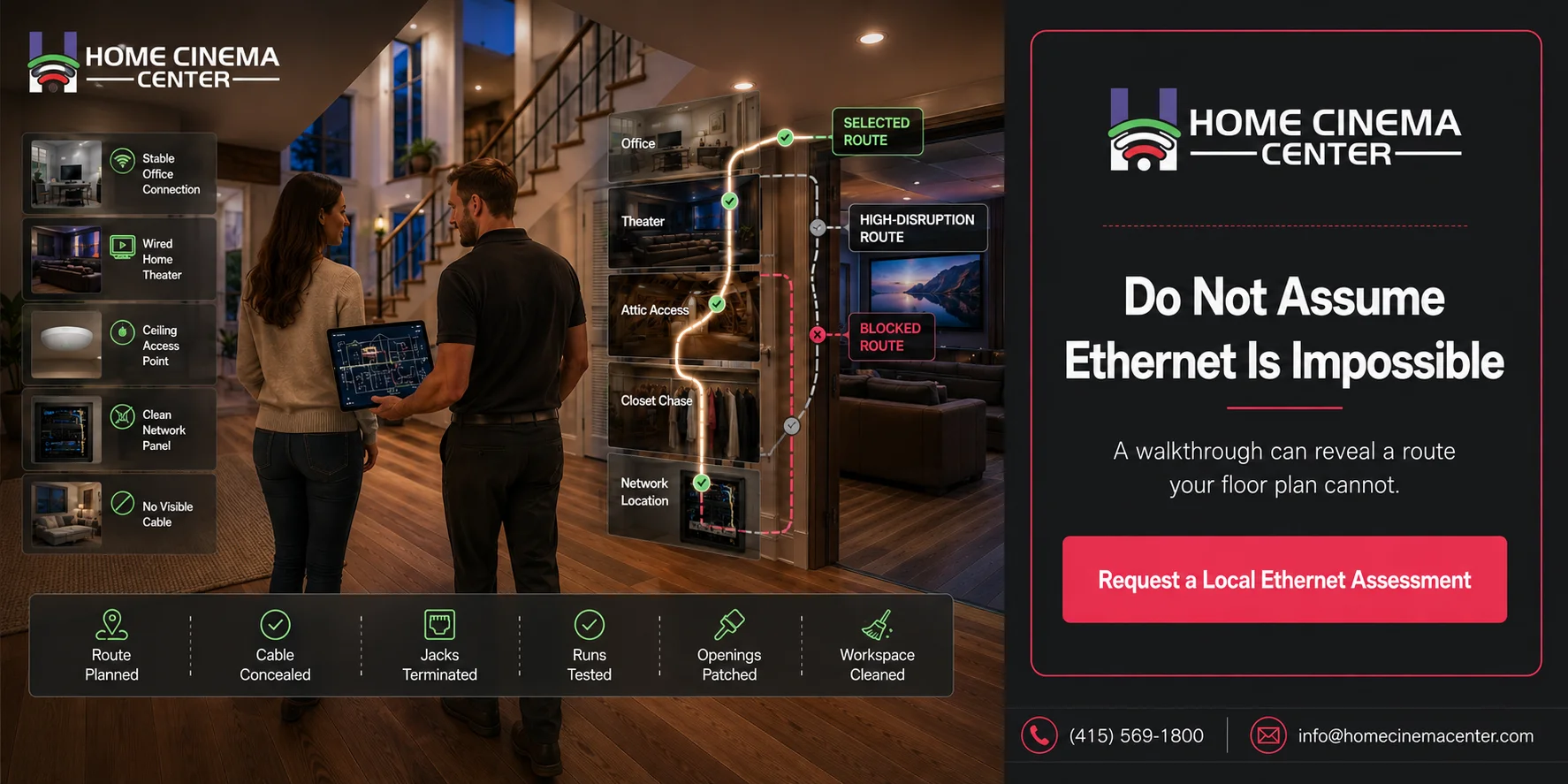
Before any cable goes in, an installer typically maps out where connections are actually needed home theater, office, gaming setup, security cameras, access points and works backward from there to find the most efficient path, usually starting from the attic or a central wiring location and dropping cable down into walls near each destination.

How Cable Gets Run Through Finished Walls
This is the part that surprises most people. Rather than tearing open drywall across a whole wall, installers use techniques like fishing cable through wall cavities with specialized tools, drilling small access points that get patched afterward, and routing through attics and crawl spaces wherever possible to minimize any wall openings at all. In most homes, the vast majority of the run avoids visible wall damage entirely.
Dealing With Tricky Spots
Not every wall path is simple. Insulation, fire blocking (horizontal blocking inside walls), multi-story layouts, and finished ceilings can all complicate a run. Experienced installers have workarounds for most of these alternate paths, small localized openings, or running cable along baseboards or in surface-mount raceways when a fully hidden path isn’t possible.

Termination and Testing
Once cable is run, each end gets terminated typically into a wall jack on one end and a patch panel or network switch on the other. A professional installation also includes testing each cable run to confirm it meets performance standards, which is easy to skip but important, since a bad termination can bottleneck an otherwise solid installation.
Patching and Cleanup
A quality installation includes patching any wall openings and leaving the space looking the way it did before the work started this is worth confirming as part of any quote, since patching quality varies a lot between installers.
What to Expect from the Process
| Stage | What happens | What to ask about |
| Assessment | Installer walks the home, identifies destinations and best cable paths | Whether attic/crawl space access is sufficient |
| Planning | Cable routes mapped, equipment location (patch panel/switch) determined | How many runs and jacks are included |
| Running cable | Cable fished through walls, attic, and crawl spaces | How many wall openings will be needed |
| Termination & testing | Jacks and patch panel installed, each run tested | Whether testing is included in the quote |
| Patching & cleanup | Any wall openings patched and finished | Whether patching/paint touch-up is included |
Getting Ready for an Ethernet Installation
- List every device or room you actually want wired TVs, home theater, office, gaming console, security system before the walkthrough.
- Think about where your equipment will live a closet or utility space for the patch panel and switch keeps things tidy.
- Mention any known tricky spots, like finished ceilings or additions, so the installer can plan around them.
- Ask how many wall openings the job is likely to need, and what the patching process looks like.
- Consider running a couple of extra cables while walls are open it’s far cheaper than a second visit later.
A Familiar Scenario
A homeowner in San Rafael assumed wiring their home office and media room for Ethernet would mean opening up several walls and living with a mess for days. The installer instead ran nearly the entire path through the attic and an unused chase behind a closet, needing only two small, patchable openings for the final drops into each room. The whole job was done in a day, with cleanup included, and the homeowner never would have guessed cable was routed through their walls at all.

Common Misconceptions About Running Ethernet Cable
“This only works in new construction.” Fishing cable through finished walls is a standard technique for existing homes it’s one of the most common calls a home networking installer gets.
“It means big holes in my walls.” In most homes, cable runs mostly through attics and crawl spaces, with only small, patchable openings needed for the final drop into a room.
Do this, not that: Don’t assume Ethernet wiring isn’t possible in your home just because it wasn’t pre-wired during construction ask a professional to assess it before ruling it out.
Get Your Home Wired by Home Cinema Marin
Home Cinema Marin runs Ethernet cable through homes throughout Marin County and the greater Bay Area, with clean installs, proper termination and testing, and patching included. Explore our home networking services or call (415) 897-6217 to schedule an assessment.
FAQ
Can you hire someone to run Ethernet cable through a house?
Yes, professional low-voltage and home networking installers regularly run Ethernet cable through existing, finished homes, not just new construction.
Does running Ethernet cable require opening up my walls?
Usually only minimally. Most of the cable path runs through attics and crawl spaces, with just a few small, patchable openings needed for final connections.
Is it expensive to add Ethernet wiring to an older home?
It’s typically more involved than new construction wiring, but far more affordable and less disruptive than most homeowners expect.
How long does it take to wire a house for Ethernet?
A typical job for a few rooms can often be completed in a single day, depending on the number of runs and any tricky spots in the home’s layout.
What rooms should I wire with Ethernet first?
Home theaters, home offices, and gaming setups benefit the most from wired connections due to their need for consistent, high-speed performance.
Will the installer patch the walls after running cable?
A quality installation includes patching any wall openings it’s worth confirming this is included when getting a quote.
Is Ethernet cable installation only useful for tech-heavy homes?
No even homes with just a few key devices, like a smart TV or home office setup, benefit from the reliability wired connections provide over Wi-Fi alone.
Can I add more Ethernet runs later if I only wire a few rooms now?
Yes, but it’s often more efficient to run a few extra cables during the initial installation, since a second visit adds cost.
What’s the difference between wired Ethernet and mesh Wi-Fi?
Wired Ethernet delivers more consistent speed and is less prone to interference, while mesh Wi-Fi offers more flexible coverage without any cable runs.
Where can I get Ethernet cable installed in Marin County?
Home Cinema Marin serves Novato, Mill Valley, San Rafael, Sausalito, Tiburon, and the greater Bay Area contact us or call (415) 897-6217 to schedule an assessment.