
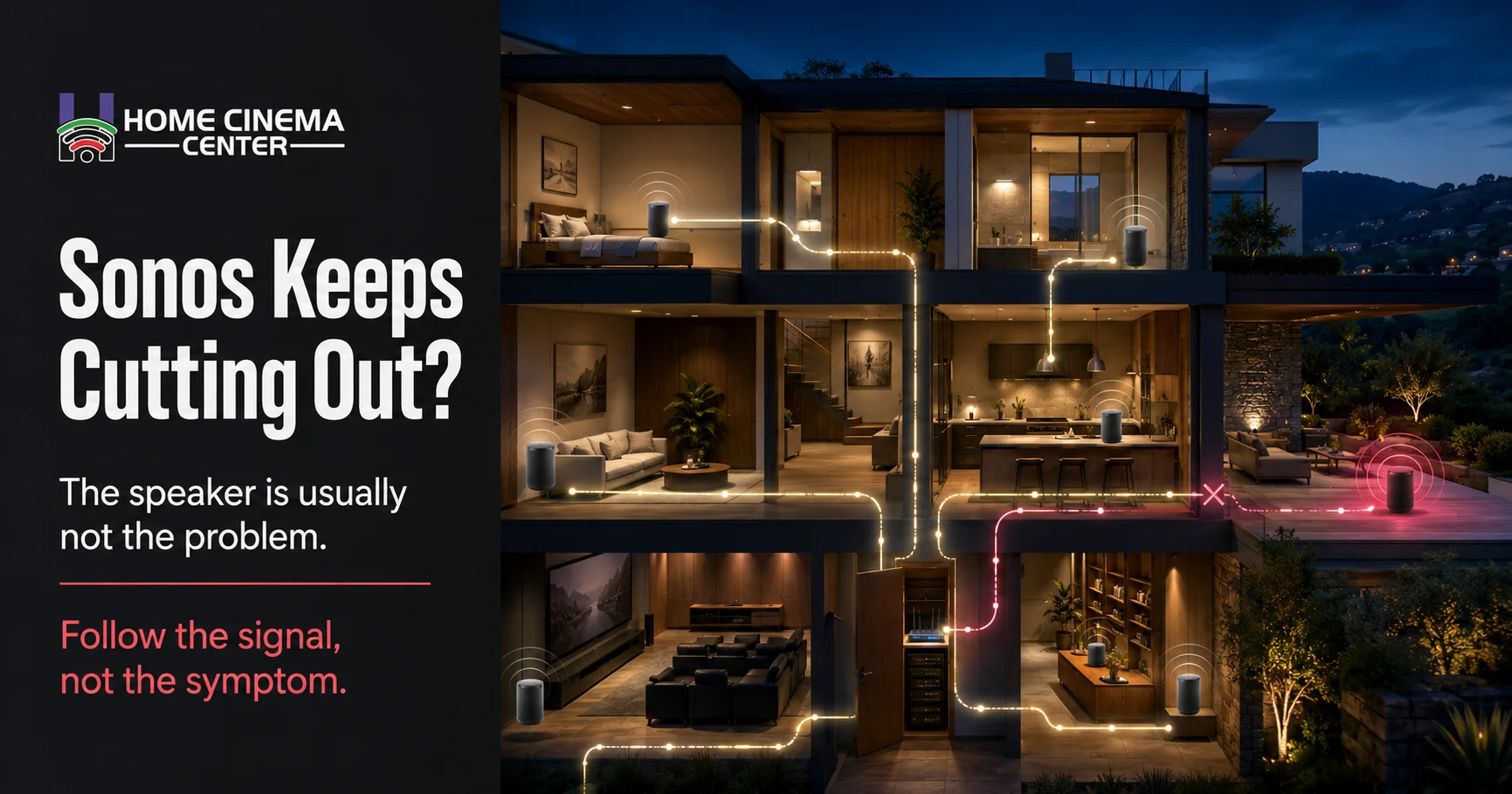
Your Sonos should not turn music night into a troubleshooting session. If it works in one room but cuts out when the kitchen, patio, and living room are grouped, the speaker is usually not the real problem. Most dropouts come from weak Wi-Fi, wireless interference, router changes, SonosNet settings, app issues, or a network that was never designed for whole-home audio.
That is the hidden truth of premium home technology: expensive gear can still feel cheap when the invisible system behind it is messy.
Key Takeaways
- Sonos dropouts are usually caused by network behavior, not broken speakers.
- Do not factory reset Sonos as the first step.
- Router changes, mesh Wi-Fi, SonosNet, and app updates can all make speakers disappear.
- Larger Marin County homes often need better network design before the audio feels reliable.
Why Sonos Keeps Cutting Out

Sonos keep cutting out when the speaker, app, router, and grouped rooms cannot stay in steady communication. That can happen because of weak wireless signals, crowded Wi-Fi channels, mesh Wi-Fi roaming, a recent router change, outdated software, Ethernet conflicts, or a Sonos Net setup that no longer fits the home.
Sonos says music can stop or skip when a product has a weak wireless connection to the router or to the nearest wired Sonos product. Sonos also points to wireless interference as a common reason audio stops, skips, or becomes unstable. Sonos Support explains audio stopping and skipping here.
Here is the part that frustrates homeowners: fast internet does not always mean stable Sonos.
A home can stream 4K video just fine and still have Sonos audio dropouts. Streaming a movie mostly depends on internet bandwidth. Sonos also depends on local network discovery, speaker grouping, router behavior, Wi-Fi coverage, and whether each speaker can “see” the others inside the home.
In plain English, your internet may be fine while your home network is fighting itself.
For homes with multiple rooms, patios, in-ceiling speakers, or a theater setup, home network design and WiFi setup is often the real fix behind reliable Sonos performance.
The Problem Most People Miss

Most homeowners treat Sonos like a regular wireless speaker. It is not.
A single Bluetooth speaker only has to connect to one phone. A Sonos system may include a soundbar, Sub, surrounds, portable speakers, music services, AirPlay, Apple TV, the Sonos app, and grouped rooms playing together. That is not just a speaker. It is a small audio network living inside a larger home network.
When the network is clean, Sonos feels effortless. When the network is messy, everything feels haunted.
Speakers vanish from the app. Volume changes lag. Music stops halfway through dinner. The patio drops out. The Sub disappears during a movie. Then everything works again after a reboot, which makes the problem even more annoying.
That reboot is not always a fix. Sometimes it is just a temporary reset before the same hidden cause comes back.
Charles Eames said, “The details are not details. They make the product.” That is exactly how Sonos behaves. One poor router location, one weak access point, one guest network mistake, or one bad cable can make a premium system feel unreliable.
Quick Self-Check Before You Blame the Speaker
Run this simple check before replacing equipment or factory resetting anything.
- Does the issue happen in one room or everywhere?
- Does it get worse when several rooms are grouped?
- Did it start after a new router, mesh Wi-Fi system, or app update?
- Is the phone on the same Wi-Fi network as Sonos?
- Is the speaker near a microwave, thick cabinet, metal shelf, or other electronics?
- Does the app say, “No products found”?
- Does the TV soundbar keep playing while the Sub or surrounds drop?
Sonos recommends checking power, rebooting the router, confirming the phone or tablet is on the same Wi-Fi network as Sonos, avoiding guest networks, turning off VPN, and checking Ethernet cables when the app shows “No products found.” The official Sonos “No products found” guide covers these steps.
If one of those checks immediately points to the issue, the fix may be simple. If several of them apply at once, the system likely needs a deeper look.
The Hidden Causes Behind Sonos Dropouts
| What you notice | What it often means | What to check first | What not to do |
| Sonos music keeps stopping | Weak Wi-Fi or interference | Speaker location and router position | Replace the speaker first |
| Sonos keeps disappearing from app | Discovery or network issue | Same Wi-Fi, VPN, guest network, router reboot | Factory reset immediately |
| Sonos lagging on WiFi | Congestion or poor access point placement | Mesh node location and signal strength | Assume internet speed is the cure |
| Sonos cuts in and out when grouped | Multi-room network strain | Test one room, then add rooms | Group the whole house while testing |
| Sonos keeps cutting out after router change | New Wi-Fi or router settings | Reconnect Sonos and check network layout | Keep rebooting without reconfiguration |
| Sub or surrounds drop during TV | Soundbar bond or network instability | HDMI eARC, Wi-Fi radio, surrounds, Sub | Disable settings blindly |
| SonosNet causing dropouts | Extra wireless layer or mixed wired setup | Wired speakers and SonosNet status | Disable SonosNet without a plan |
That table is the shortcut. The symptom usually tells you where to look.
Why Sonos Disappears After a Router Change
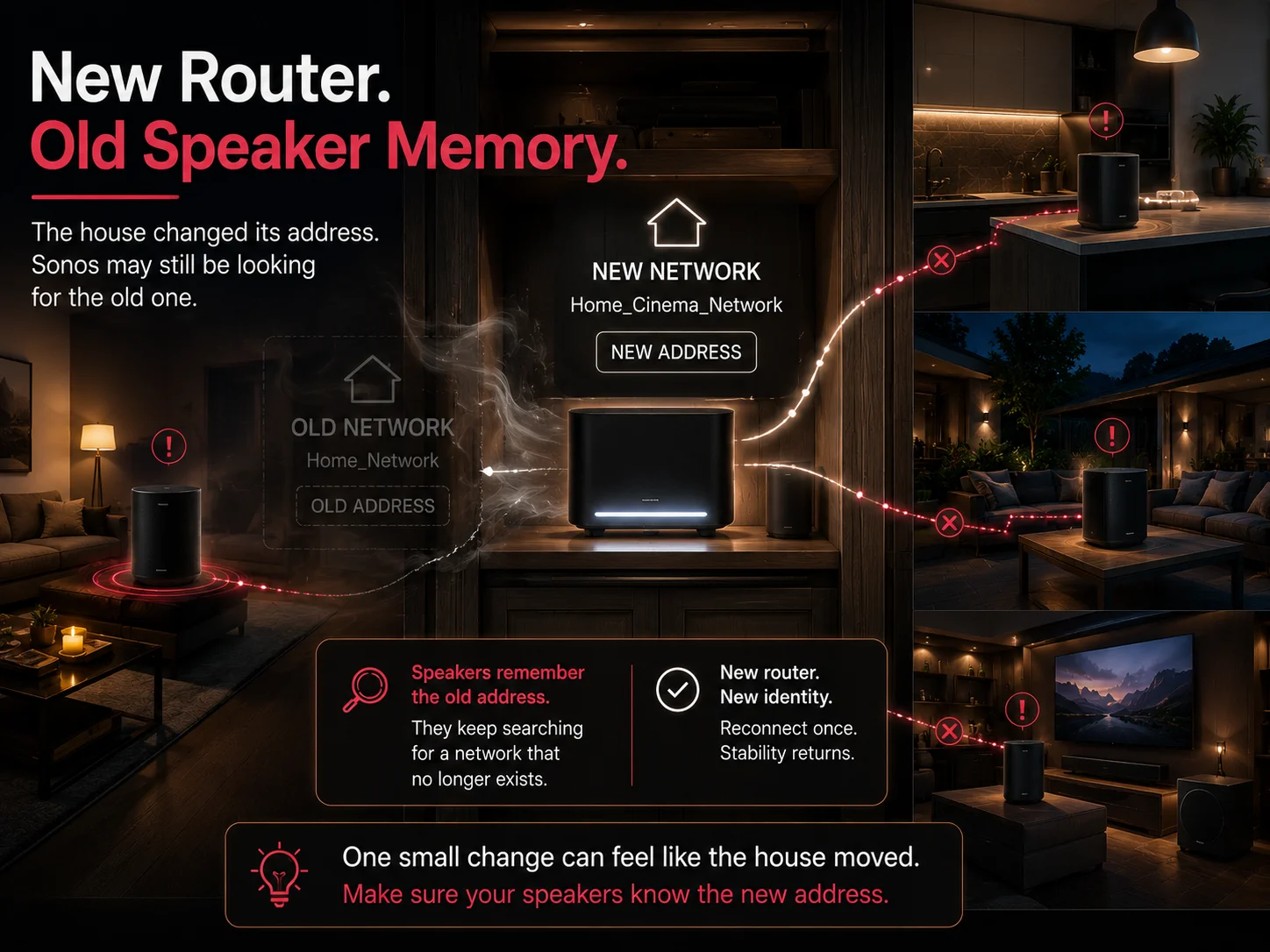
A new router feels like an upgrade. For Sonos, it can feel like the house moved and forgot to leave a forwarding address.
If the Wi-Fi name, password, router mode, IP range, or mesh setup changes, Sonos may still be looking for the old network. The app may see one version of the network while some speakers sit somewhere else. That is why Sonos keeps cutting out after router change is such a common problem.
This gets especially tricky in homes with multiple access points, outdoor zones, detached offices, thick walls, finished ceilings, or AV equipment hidden in cabinets.
A router hidden in a media cabinet might look clean, but it can choke the signal. A mesh node placed too far away may show “connected” while still delivering a weak path. A guest network may let a phone use the internet while blocking it from seeing Sonos. A VPN may do the same thing.
The speaker looks guilty because it is the thing going silent. The network may be the one causing trouble.
Wi-Fi Interference: The Boring Problem That Ruins Good Audio
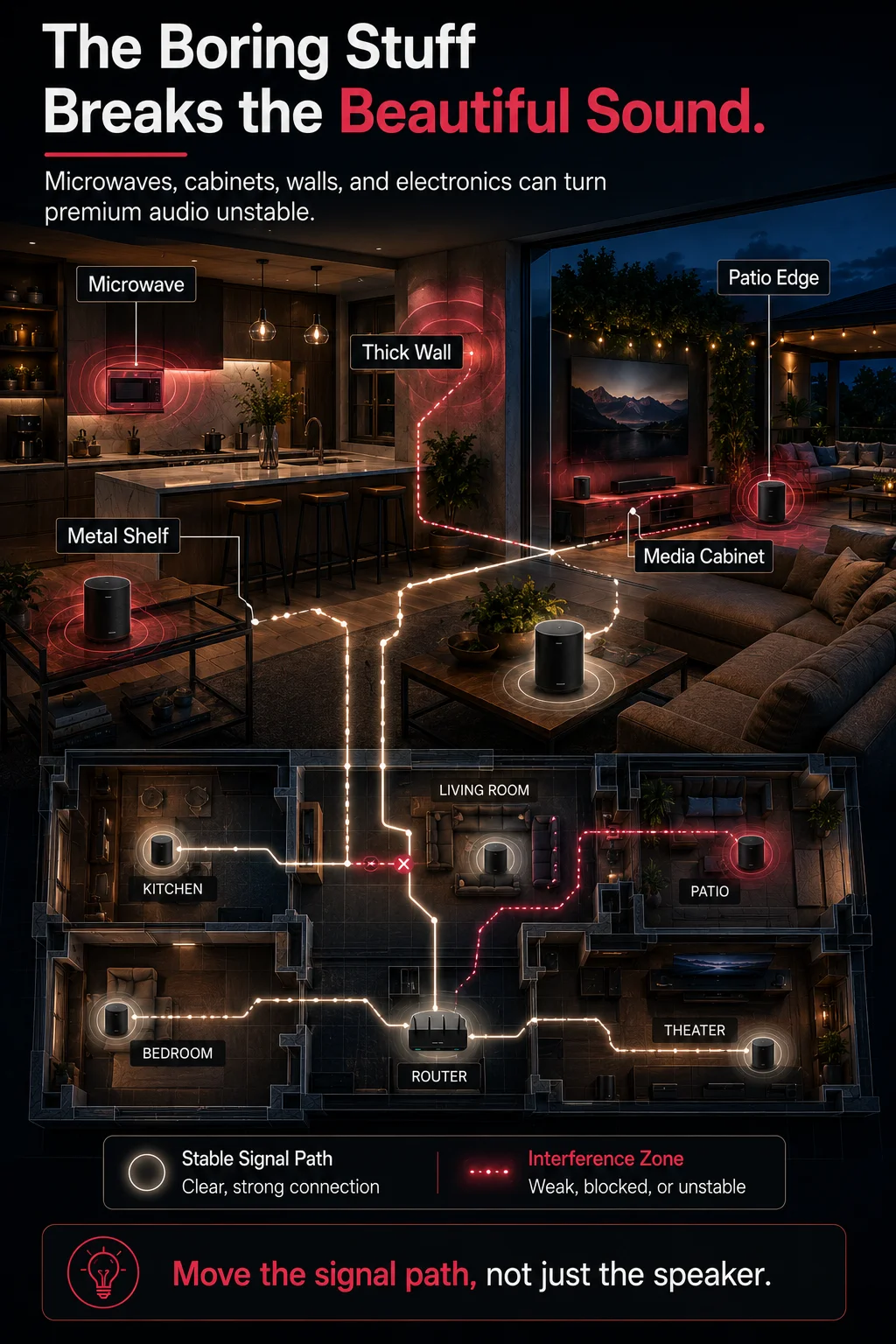
Wireless interference is not dramatic, but it is powerful.
Microwaves, baby monitors, wireless cameras, cordless devices, thick walls, metal racks, crowded router channels, and nearby electronics can all make Sonos unstable. Sonos recommend placing products at least 18 inches, or 0.5 meters, away from other electronic devices when interference is suspected. Sonos explains wireless interference reduction here.
That does not mean every speaker needs to sit in the middle of the room like a museum piece. It means placement matters.
A Sonos One tucked behind a coffee machine may struggle. A Roam at the far edge of a patio may drop. A Beam inside a cabinet is asking for trouble. An Era 300 surround placed too close to other electronics may behave differently than it did during setup.
Good audio is not only about the speaker. It is about the room, the signal, and the path between devices.
For systems tied into a media room, home theater installation should account for Wi-Fi coverage, speaker placement, wiring, screen location, and how the room is actually used.
SonosNet vs Modern Wi-Fi: Should You Disable It?
SonosNet is Sonos’ own wireless mesh network. It can activate when a compatible Sonos product is wired to the router with Ethernet. Years ago, this often helped because many home Wi-Fi networks were weaker than they are today.
Now the answer is more nuanced.
In some homes, SonosNet still helps. In others, especially homes with strong modern mesh Wi-Fi, SonosNet can add another wireless layer that makes troubleshooting harder. That is why disable SonosNet has become a serious question, not a random setting to click.
Sonos release notes show that app version 85.01.4 for Android and 85.01.2 for iOS, released May 27, 2026, added the ability to enable or disable SonosNet. The current Sonos app version listed by Sonos is 86.01.5, released June 23, 2026, with bug fixes and improved performance. The Sonos app release notes list these updates.
So should every homeowner disable SonosNet?
No.
If the system includes older Sonos products, wired speakers, poor Wi-Fi coverage, or a mixed setup, changing SonosNet without understanding the layout may create new problems. If the home has a strong, well-designed Wi-Fi network, disabling SonosNet may simplify the system.
The right answer depends on the house.
That is the premium home tech truth: settings are not magic. Design comes first.
Mesh Wi-Fi Can Help Sonos, But It Can Also Confuse It
Mesh Wi-Fi sounds like the perfect fix. More nodes. More coverage. Fewer dead zones.
Sometimes that is true. Sometimes it creates a new kind of problem.
Sonos likes stability. Some mesh systems like movement. They may steer devices between bands or nodes, which is helpful for phones walking through the house but not always ideal for speakers that need steady communication. If a speaker keeps moving between connection points, grouping can lag, rooms can fall out of sync, and the app may feel slow.
Modern Wi-Fi has also changed quickly. For example, Wi-Fi 6E uses the 6 GHz band, and Cisco notes that the FCC opened 1,200 MHz of spectrum in that band for Wi-Fi 6E devices. Cisco explains Wi-Fi 6 vs Wi-Fi 6E here.
That extra wireless capacity can be great for newer devices, but it does not automatically fix every Sonos issue. Sonos performance still depends on placement, router settings, local discovery, grouping, and whether the system is designed as one clean network.
In Marin County and Novato homes, this matters because properties often include hillside layouts, patios, thick construction, remodels, finished walls, fireplaces, and equipment hidden for a cleaner look. Those choices can make the home beautiful while quietly making Wi-Fi harder.
TV Audio Dropouts Are a Different Animal
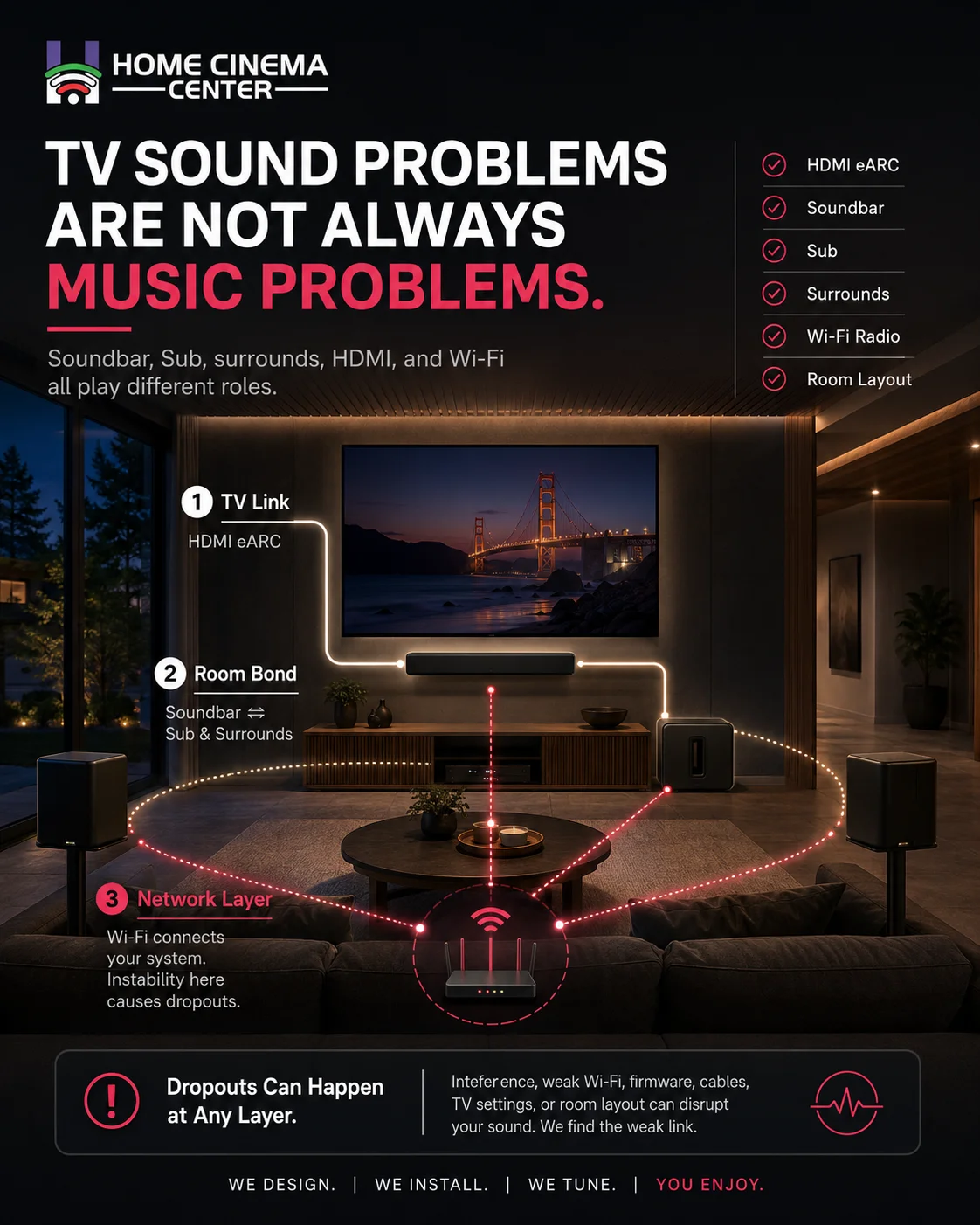
If the problem happens with Sonos Arc, Beam, Sub, or surrounds, do not treat it exactly like a music-streaming issue.
TV audio may involve HDMI eARC, TV audio output settings, CEC behavior, surround bonding, and the soundbar’s connection to the Sub and rear speakers. The soundbar may keep playing TV audio while the Sub or surrounds drop because the TV connection and the Sonos room bond are not the same thing.
Check these first:
- Is the HDMI cable seated firmly?
- Is the TV using the correct HDMI ARC or eARC port?
- Is the TV output set to external speakers?
- Does the problem happen with music, TV, or both?
- Are Sub and surrounds dropping while the soundbar keeps playing?
- Was Wi-Fi disabled on a wired soundbar?
This is where clean installation matters. TV and sound system installation is not just hiding wires. It is making sure the room, TV, soundbar, network, and control system work together without turning every movie night into tech support.
DIY Fixes That Are Actually Worth Trying

Try these before calling anyone.
- Update the Sonos app and system software.
- Reboot the router and wait until the network is fully back.
- Confirm the phone and speakers are on the same Wi-Fi network.
- Turn off VPN on the phone, tablet, or computer.
- Avoid guest networks for Sonos control.
- Move affected speakers away from electronics and dense cabinets.
- Test one speaker by itself before grouping rooms.
- If the problem started after a router change, reconnect Sonos to the new network.
- Inspect Ethernet and HDMI cables.
- Check whether SonosNet is active before changing it.
Do not factory reset Sonos first.
That may erase helpful setup information without fixing the real cause. It is like repainting a wall because the lights keep flickering.
DIY Is Enough When the Cause Is Obvious
DIY troubleshooting can work when the problem is simple.
Maybe the phone is on a guest network. Maybe the router needs a reboot. Maybe one speaker lost power. Maybe the app is outdated. Maybe the speaker is sitting too close to another electronic device.
Fix that and move on.
But if the problem returns every few days, the system has not been fixed. It has been refreshed.
That repeating pattern usually points to a deeper network issue: IP conflicts, poor access point placement, mesh Wi-Fi behavior, SonosNet confusion, wiring mistakes, or too many devices competing for the same weak signal.
When to Call a Pro
Call a professional when:
- Speakers disappear from the Sonos app again and again.
- Grouped rooms lag or collapse during playback.
- The issue started after a router or mesh Wi-Fi upgrade.
- A Sonos Arc, Beam, Sub, or surrounds keep dropping.
- The system includes in-ceiling speakers, outdoor zones, or several rooms.
- Ethernet and Wi-Fi are mixed without a clear plan.
- Reboots help for a short time, then the issue returns.
- Other smart home devices also lag, buffer, or disconnect.
This is the lead bridge most homeowners need: the speaker may be fine, the app may be fine, and the internet may be fine. The real issue may be how the home network, wiring, room layout, and audio system were put together.
Conclusion: Fix the System, Not Just the Symptom
When Sonos keeps cutting out, the easy answer is to blame the speaker. The smarter answer is to follow the signal.
Start with simple checks. Update the app. Reboot the router. Make sure the phone and speakers are on the same network. Look for interference. Test one room before grouping the whole house. If the problem began after a router change, mesh upgrade, remodel, or new home theater setup, treat the network as the main suspect.
Premium technology should feel quiet in the best way. No lag. No missing rooms. No mystery dropouts. Just music where it belongs.
If the system keeps making the same complaint, listen to it. The speaker is probably telling you the house needs a better plan.

For a clean local solution, schedule a local Sonos consultation with Home Cinema Center.
Call 415 897 6217 or 415-892-5509 or email info@homecinemamarin.com.
FAQ
Why does my Sonos keep cutting out?
Sonos usually cuts out because of weak Wi-Fi, wireless interference, router changes, outdated software, SonosNet issues, or grouped speakers losing stable network communication.
Why does Sonos lag on WiFi?
Sonos may lag on WiFi when the signal is weak, the router is overloaded, or mesh Wi-Fi moves speakers between nodes too aggressively.
Why does Sonos disappear from the app?
Sonos can disappear from the app when the phone and speakers are not on the same network, VPN is active, the router needs rebooting, or a speaker loses power.
Why does Sonos keep stopping during music?
Music may stop because the speaker has a weak wireless connection, the network is congested, the streaming service is unstable, or the speaker is too far from the router or access point.
Why does Sonos cut out after changing router?
A new router may change the Wi-Fi name, password, IP range, or network settings. Sonos may need to be reconnected, and the network may need reconfiguration.
Does mesh WiFi affect Sonos?
Yes. Mesh WiFi can help Sonos when designed well, but it can also cause problems if speakers are moved between nodes or separated by network settings.
What is SonosNet?
SonosNet is Sonos’ own wireless mesh network that can activate when a compatible Sonos product is wired to the router with Ethernet.
Should I disable SonosNet?
Only disable SonosNet when the network layout supports it. In some modern Wi-Fi homes, it may help, but in mixed wired and wireless systems it should be handled carefully.
Are Sonos better on WiFi or Ethernet?
It depends on the home. A small system may work well on Wi-Fi, while larger homes, outdoor zones, and theater rooms may need a careful mix of wired and wireless planning.
Do I need a Sonos installer?
A Sonos installer makes sense when dropouts continue after basic fixes, speakers keep disappearing, the home has multiple audio zones, or the network setup is complex.


